# View service logs

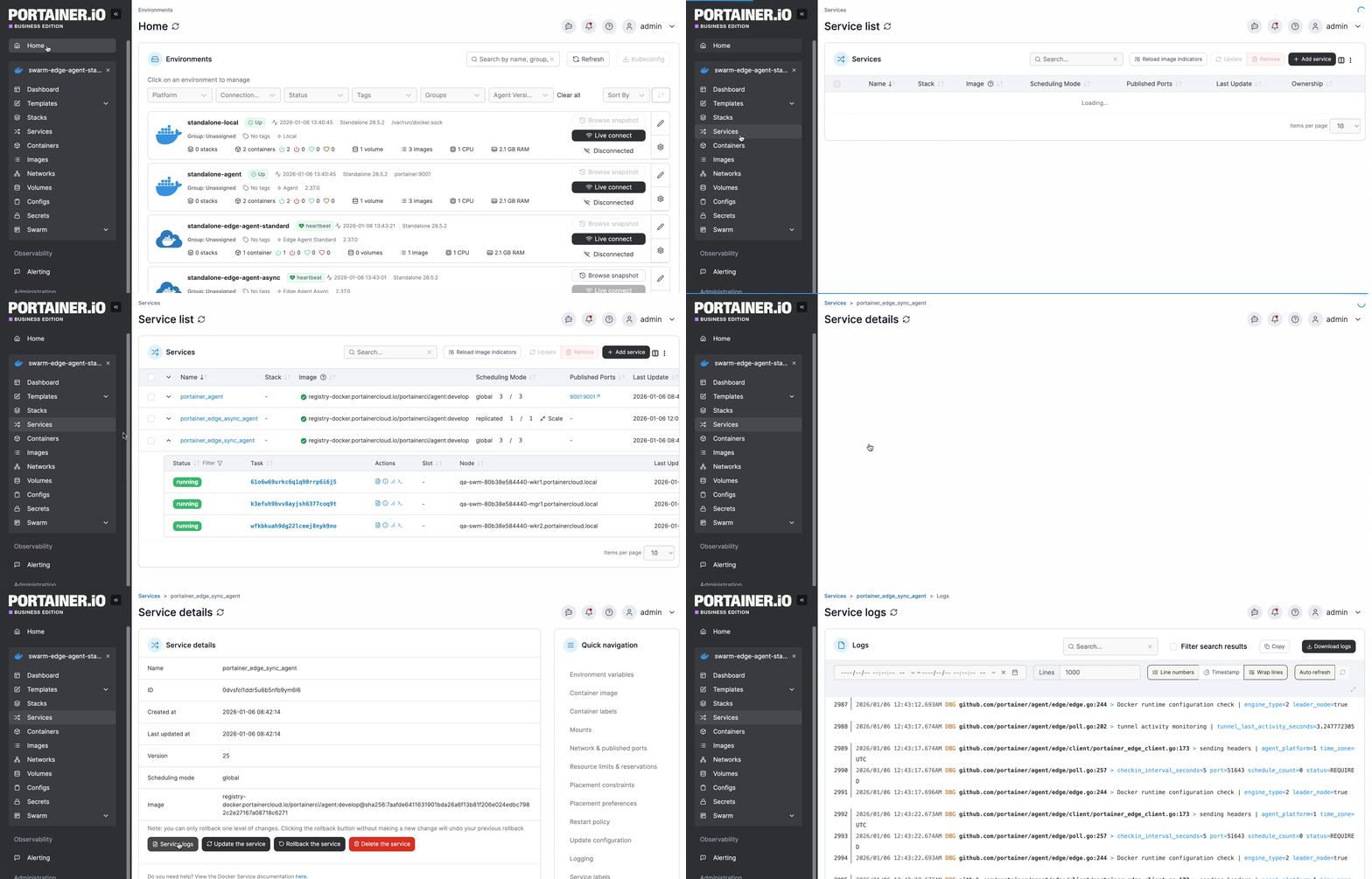
From the menu select **Services**, select the service whose logs you want to view then click **Service logs**.

<figure><img src="https://content.gitbook.com/content/xdTQRpMuktD2l0URtOJO/blobs/b6qd6vBZ5uBkqZpyWMLM/Service-logs-new.gif" alt=""><figcaption></figcaption></figure>

Here you can see the contents of the Docker logs for your service.&#x20;

<table><thead><tr><th width="236">Field/Option</th><th>Overview</th></tr></thead><tbody><tr><td>Search</td><td>Enter a string to search the log output. You can see the number of results for your search and move through each result with the up and down arrows.</td></tr><tr><td>Filter search results</td><td>When enabled, display only the log lines that contain your search string.</td></tr><tr><td>Copy</td><td>Click this button to copy the currently displayed log lines to your clipboard.</td></tr><tr><td>Download logs</td><td>Click this button to download your log.</td></tr></tbody></table>

<figure><img src="https://content.gitbook.com/content/xdTQRpMuktD2l0URtOJO/blobs/PIer3yhXY7Xz2ye32V1A/2.17-containers-logs-search.png" alt=""><figcaption></figcaption></figure>

You can also set various options for how the logs are displayed:

<table><thead><tr><th width="238">Field/Option</th><th>Overview</th></tr></thead><tbody><tr><td>Date picker</td><td>Select the time period from which to retrieve the logs.</td></tr><tr><td>Lines</td><td>Limit the number of lines per log file (the default is 1000).</td></tr><tr><td>Line numbers</td><td>When enabled, display line numbers for each log line.</td></tr><tr><td>Timestamp</td><td>When enabled, display a timestamp before each log line.</td></tr><tr><td>Wrap lines</td><td>When enabled, lines longer than the screen width will be wrapped onto the next line.</td></tr><tr><td>Auto refresh</td><td>Enable this option to automatically refresh the log view. When off, you can click the refresh icon to the right of the button to manually refresh the view.</td></tr><tr><td>Full screen</td><td>Click the full screen icon to expand the log display to fill your screen.</td></tr></tbody></table>

<figure><img src="https://content.gitbook.com/content/xdTQRpMuktD2l0URtOJO/blobs/6t7VLO7eWxK5gXEpFI8A/2.30-containers-logs-options.png" alt=""><figcaption></figcaption></figure>