# Add an Ingress manually

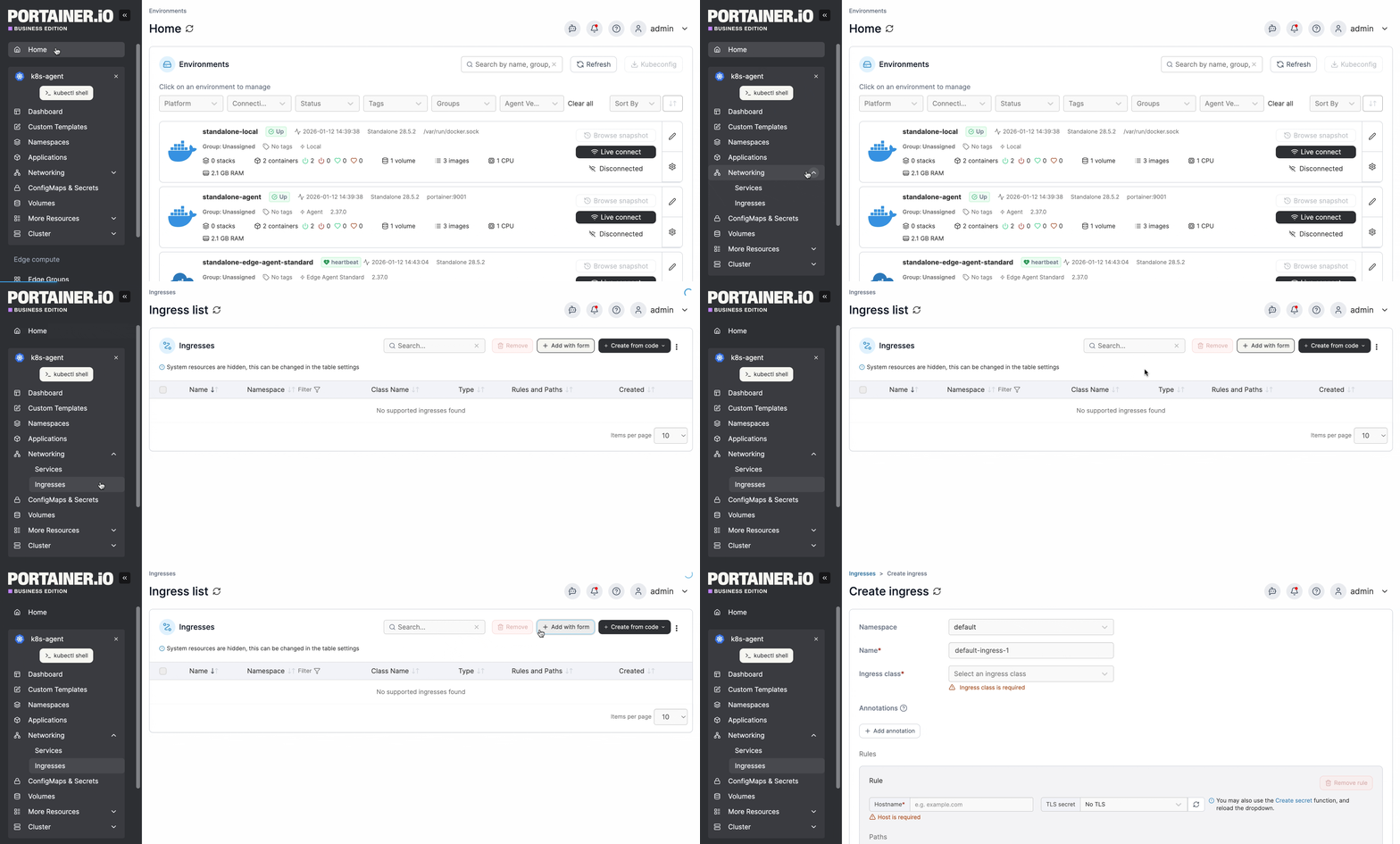
From the menu expand **Networking**, select **Ingresses** then click **Add with form**.

<figure><img src="/files/4ZULHqUQVfUr7pbGs95q" alt=""><figcaption></figcaption></figure>

Select the **namespace** that the Ingress needs to be created in from the list.

Complete the required information, using the sections below as a guide.

### Base Configuration

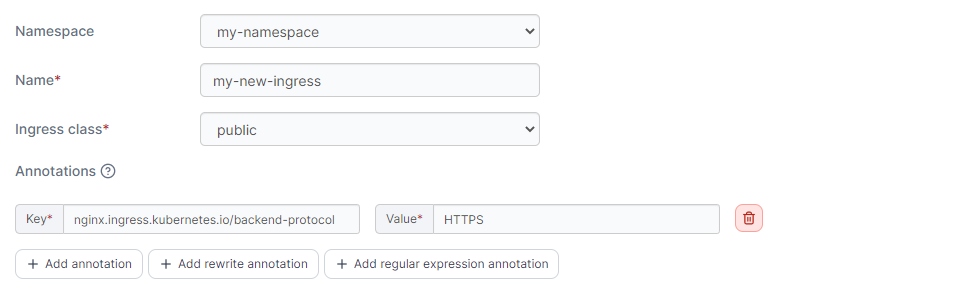
<table><thead><tr><th width="213">Field/Option</th><th>Overview</th><th data-hidden></th><th data-hidden></th></tr></thead><tbody><tr><td>Name</td><td>Enter a descriptive name for the ingress.</td><td></td><td></td></tr><tr><td>Ingress class</td><td>Select an Ingress Class object from the list, or select <strong>none</strong> when no <code>IngressClass</code> info is needed in the Ingress specification.</td><td></td><td></td></tr><tr><td>Annotations</td><td>You can add annotations to your ingress as required by clicking <strong>Add annotation</strong> and filling in the <strong>Key</strong> and <strong>Value</strong> fields. Depending on your selected ingress class you may also be able to add rewrite annotations and/or regular expression annotations.</td><td></td><td></td></tr></tbody></table>

<figure><img src="/files/BOoEWHQVgWaGTzo8OiGJ" alt=""><figcaption></figcaption></figure>

{% hint style="info" %}
**Note for Google Cloud users**

Google Cloud ingress controller (gce or GKE Ingress) continues to use the deprecated `kubernetes.io/ingress.class` annotation on ingresses, whereas most other ingress controllers use the `IngressClass` resource that was introduced in Kubernetes 1.18.

Portainer targets the `IngressClass` resource means of specifying ingress classes, but you can still use the Google Cloud ingress controllers by turning on the **Allow ingress class to be set to "none"** toggle in [Cluster setup](/user/kubernetes/cluster/setup.md#ingress-controllers) and setting them up as custom with `none` selected as their **Ingress class**. Then when adding an ingress based on this, set an annotation with the **key** `kubernetes.io/ingress.class` and **value** `gce.`
{% endhint %}

### Ingress Rule

Here you can define the specifics for the Ingress rule:

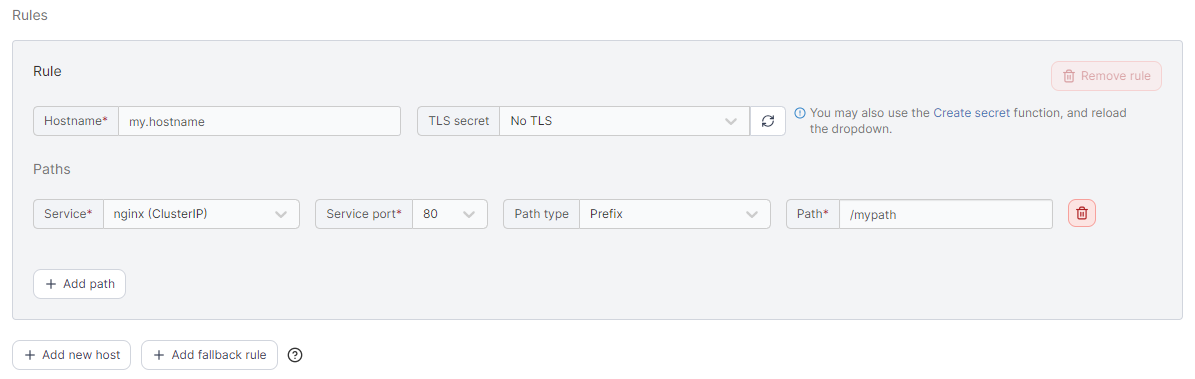
<table><thead><tr><th width="201">Field/Option</th><th>Overview</th><th data-hidden></th></tr></thead><tbody><tr><td>Hostname</td><td>Enter the FQDN that the application should be accessed with<br>eg: <code>myapp.mydomain.com</code>.</td><td></td></tr><tr><td>TLS Secret</td><td>Select the TLS secret that holds the SSL certificate information for the hostname entered above. Optionally, create a new <a href="/pages/bS93h06D3ck5ip7YhOTV">TLS Secret</a> by clicking on the <strong>Create secret</strong> link (opens in a new tab). Once secret is created click on the reload button next to the TLS secret dropdown and select the new secret.</td><td></td></tr><tr><td>Service</td><td>Select a service that you want to expose from the list.</td><td></td></tr><tr><td>Service port</td><td>Select the port that needs to be exposed from the list.</td><td></td></tr><tr><td>Path type</td><td>Select the relevant path type. The default is <code>Prefix</code>.</td><td></td></tr><tr><td>Path</td><td>Enter the path to expose the application on. To expose on the root of the domain use <code>/</code>.</td><td></td></tr></tbody></table>

You can expose other services using a different path by clicking on **Add path**.

<figure><img src="/files/6yzxzmUB2qhV4z6zegvF" alt=""><figcaption></figcaption></figure>

Add more rules by clicking on **Add new host** or a fallback rule by **Add fallback rule**.

{% hint style="info" %}
A fallback rule has no host specified. This rule only applies when an inbound request has a hostname that does not match with any of your other rules.
{% endhint %}

When you're ready, click **Create**.


---

# Agent Instructions: Querying This Documentation

If you need additional information that is not directly available in this page, you can query the documentation dynamically by asking a question.

Perform an HTTP GET request on the current page URL with the `ask` query parameter:

```
GET https://docs.portainer.io/user/kubernetes/networking/ingresses/add.md?ask=<question>
```

The question should be specific, self-contained, and written in natural language.
The response will contain a direct answer to the question and relevant excerpts and sources from the documentation.

Use this mechanism when the answer is not explicitly present in the current page, you need clarification or additional context, or you want to retrieve related documentation sections.