> For the complete documentation index, see [llms.txt](https://docs.portainer.io/llms.txt). Markdown versions of documentation pages are available by appending `.md` to page URLs; this page is available as [Markdown](https://docs.portainer.io/portainer-documentation/sts/user/docker/stacks/add.md).
# Add a new stack
There are four ways to deploy a new stack from Portainer:
| Option | Overview |
| ------------------------------------------ | ---------------------------------------------------------------------------------------------------------------------------------------------- |
| [Web editor](#option-1-web-editor) | Use our web editor to define the services for the stack using a docker-compose format. |
| [Upload](#option-2-upload) | If you have a `stack.yml` file, you can upload it from your computer and use it to deploy the stack. |
| [Git repository](#option-3-git-repository) | You can use a docker-compose format file hosted in a Git repository. |
| Custom template | If you have created a [custom stack template](/portainer-documentation/sts/user/docker/templates/custom.md), you can deploy using this option. |
## Option 1: Web editor
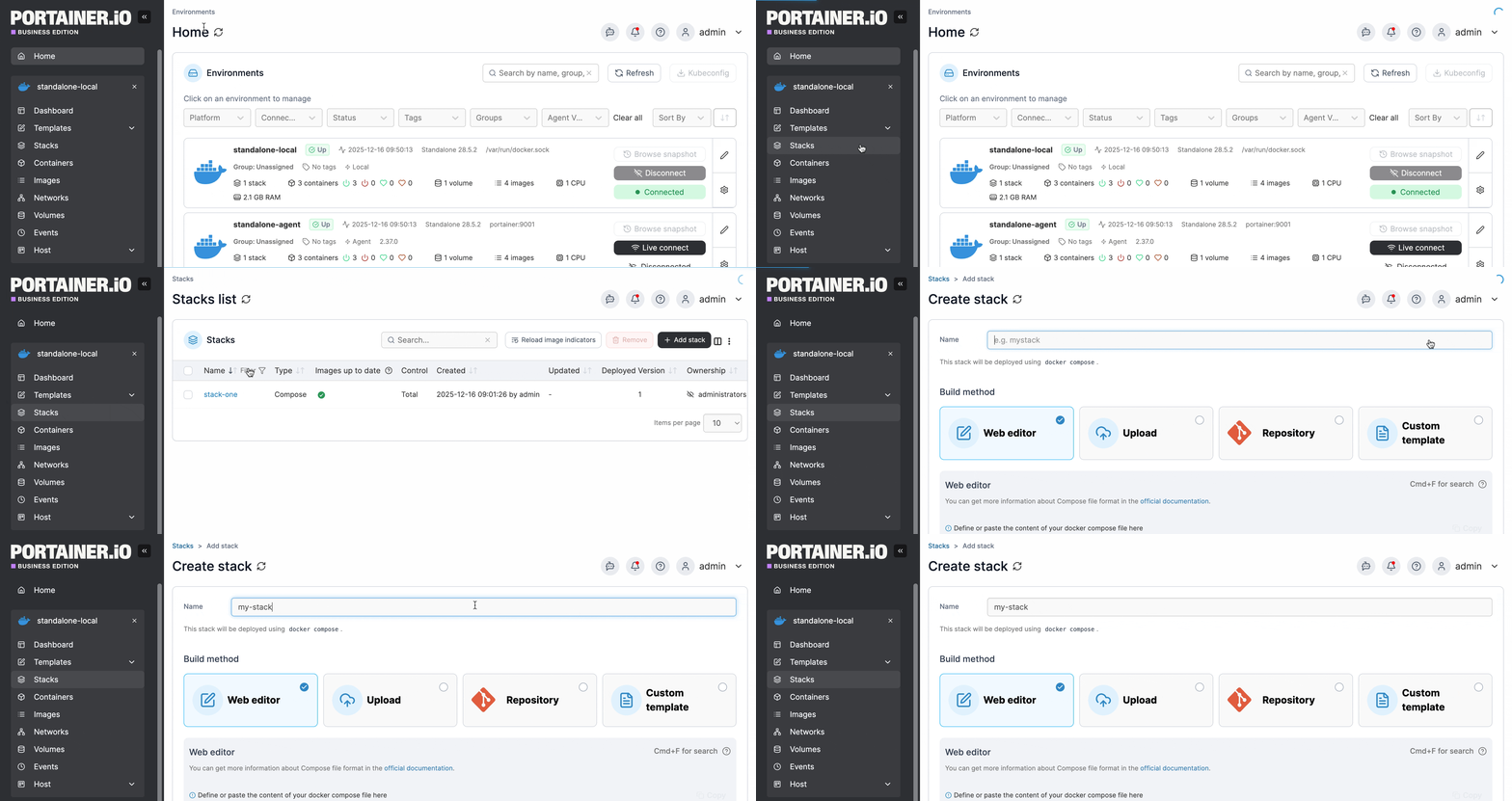
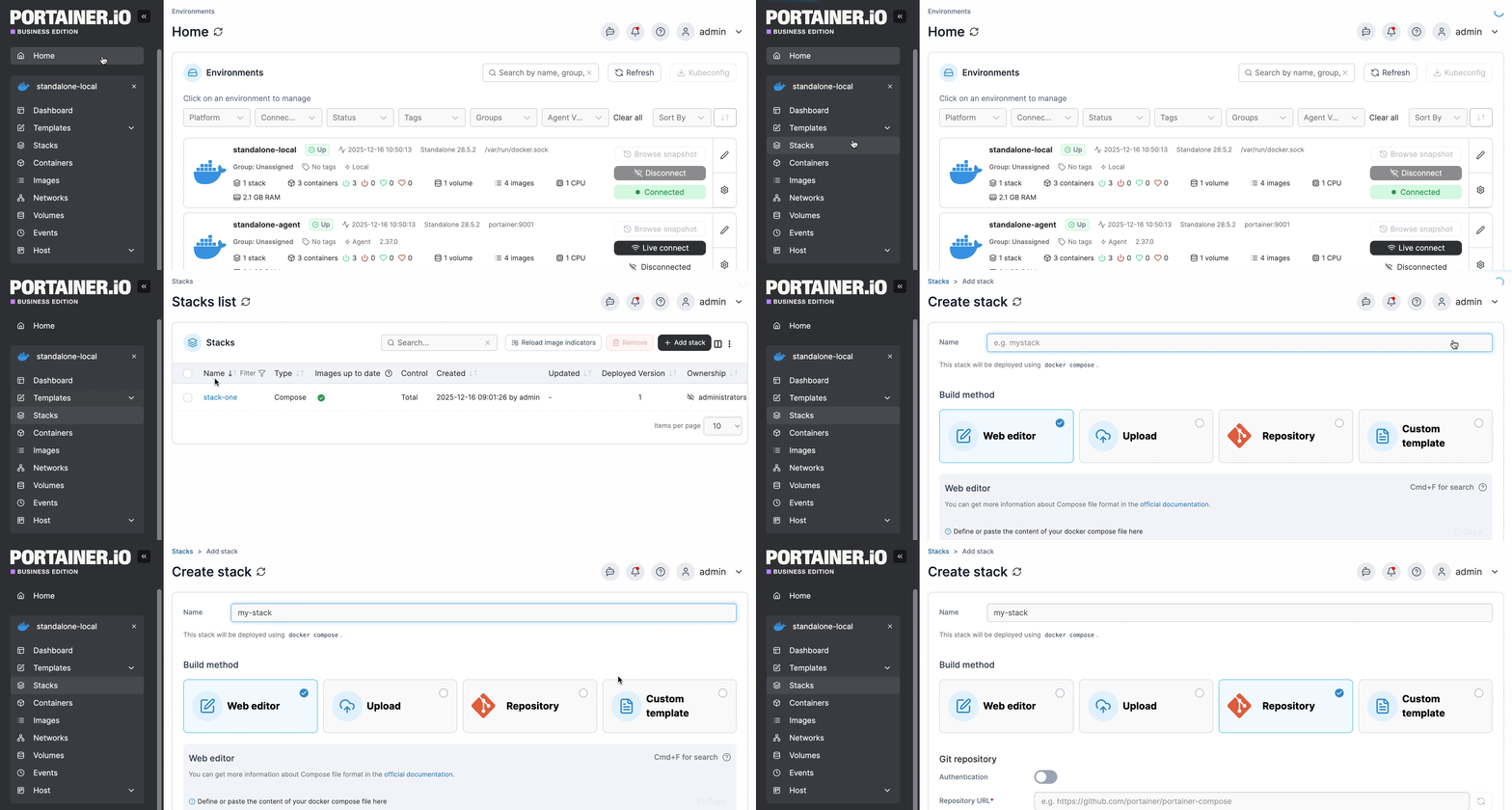
From the menu select **Stacks**, click **Add stack**, give the stack a descriptive name then select **Web editor**. Use the web editor to define the services.
{% hint style="info" %}
You can search within the web editor at any time by pressing `Ctrl-F` (or `Cmd-F` on Mac).
The web editor will visually highlight invisible special characters such as non-breaking spaces, helping you identify hidden characters that may cause unexpected errors in your configuration.
{% endhint %}
As part of the stack creation you can enable a stack webhook, allowing you to remotely trigger redeployments of the stack from your repository, for example. You can read more on this in our documentation on [stack webhooks](/portainer-documentation/sts/user/docker/stacks/webhooks.md).
As an optional step, you can also use the web editor to define environment variables. You can use these to define values in your compose file that would vary between deployments (for example, hostnames, database names, etc).
Environment variables can be set individually within Portainer or you can use **Load variables from .env file** to upload a file containing your environment variables. Environment variables you define (either individually or via a .env file) will be available to use in your compose file using an `environment` definition:
```
environment:
MY_ENVIRONMENT_VARIABLE: ${MY_ENVIRONMENT_VARIABLE}
```
Alternatively, on Docker Standalone and Podman environments you can add `stack.env` as an `env_file` definition to add all the environment variables that you have defined individually as well as those included in an uploaded .env file:
```
env_file:
- stack.env
```
**Note:** Using `env_file` to define a file does not work in Docker Swarm due to the lack of `env_file` support in `docker stack deploy` (used on Swarm environments to deploy your stack). On Docker Swarm, you will need to define each environment variable manually.
{% hint style="info" %}
Note the compose file is not changed when environment variables are used - this allows variables to be updated within Portainer without editing the compose file itself. You will still see the `${MY_ENVIRONMENT_VARIABLE}` style entry in the compose file.
{% endhint %}
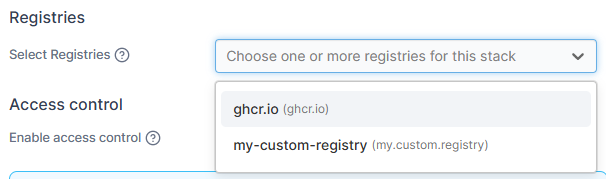
You can also select the registries to use when deploying the stack. This is useful when your stack deploys multiple images from different registries that require authentication.
{% hint style="info" %}
By default, all configured registries are used. However, when you have multiple registries from the same provider (like multiple ghcr.io registries), Docker's authentication system may use the wrong credentials during deployment. Explicitly selecting the specific registry ensures the correct credentials are used.
{% endhint %}
When you're ready, click **Deploy the stack**.
## Option 2: Upload
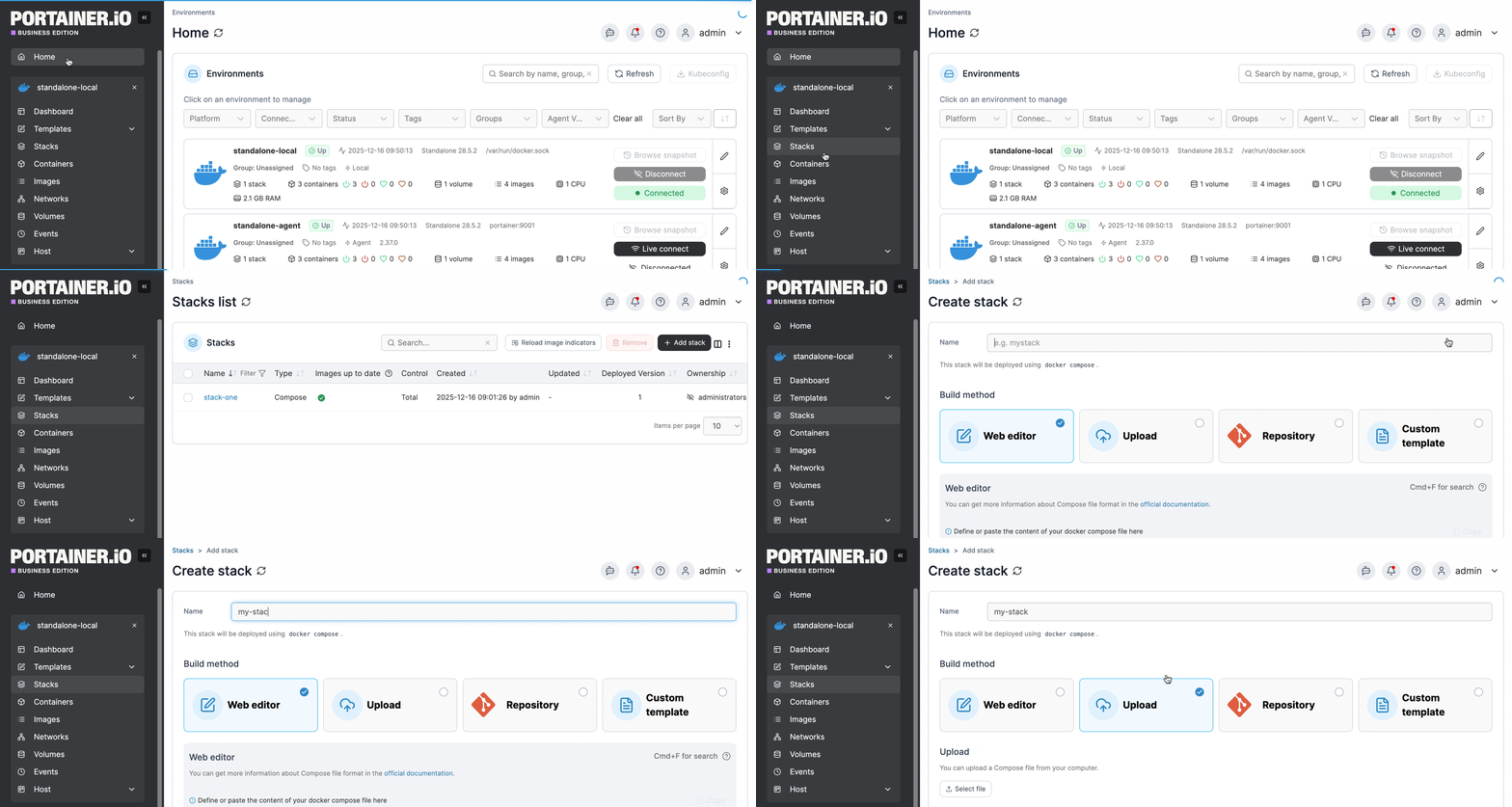
In Portainer you can create stacks from Compose YML files. To do this, from the menu select **Stacks**, click **Add stack**, then give the stack a descriptive name.
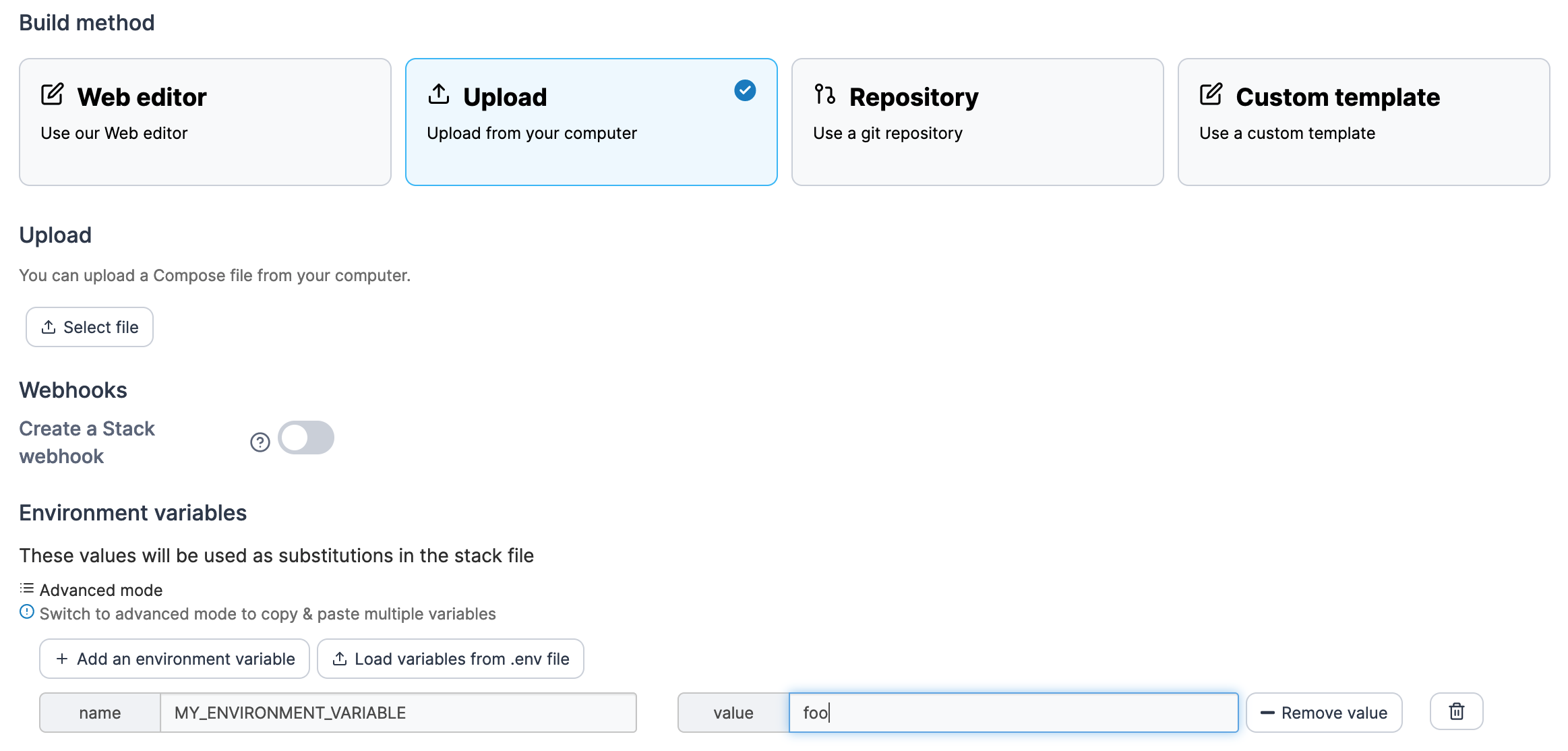
Select **Upload** then select the Compose file from your computer.
As part of the stack creation you can enable a stack webhook, allowing you to remotely trigger redeployments of the stack from your repository, for example. You can read more on this in our documentation on [stack webhooks](/portainer-documentation/sts/user/docker/stacks/webhooks.md).
As an optional step, enter any environment variables. You can use these to define values in your compose file that would vary between deployments (for example, hostnames, database names, etc).
Environment variables can be set individually within Portainer or you can use **Load variables from .env file** to upload a file containing your environment variables. Environment variables you define (either individually or via a .env file) will be available to use in your compose file using an `environment` definition:
```
environment:
MY_ENVIRONMENT_VARIABLE: ${MY_ENVIRONMENT_VARIABLE}
```
Alternatively, you can add `stack.env` as an `env_file` definition to add all the environment variables that you have defined individually as well as those included in an uploaded .env file:
```
env_file:
- stack.env
```
{% hint style="info" %}
Note the compose file is not changed when environment variables are used - this allows variables to be updated within Portainer without editing the compose file itself which would take it out of sync with your local copy. You will still see the `${MY_ENVIRONMENT_VARIABLE}` style entry in the compose file.
{% endhint %}
When you're ready click **Deploy the stack**.
## Option 3: Git repository
If your Compose file is hosted in a Git repository, you can deploy from there. From the menu select **Stacks**, click **Add stack**, then give the stack a descriptive name.
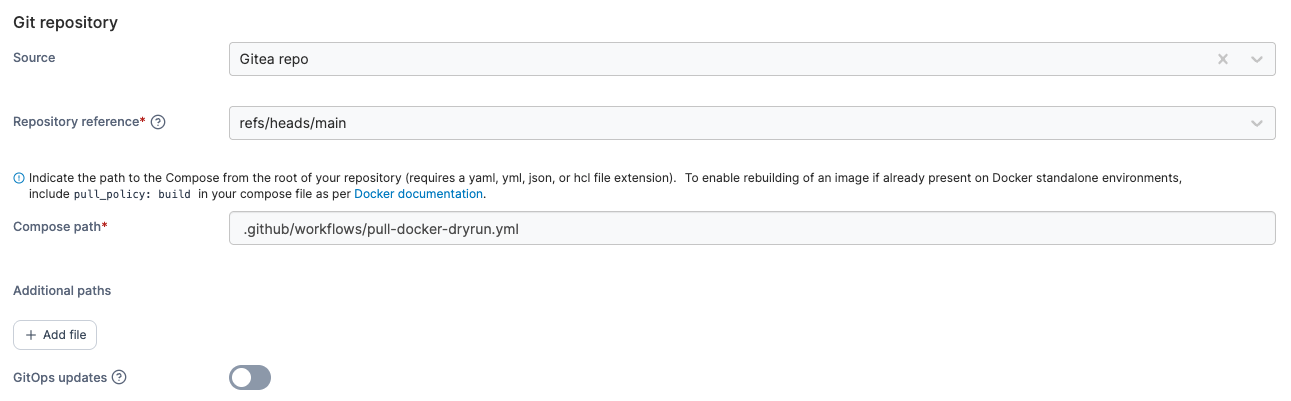
Select **Git Repository** then fill in the details of the repository.
| Field/Option | Overview |
| -------------------- | --------------------------------------------------------------------------------------------------------------------------------------------------------------------------------------------------------------------------------------------------------------------------------------------------- |
| Source | Select your Git repository from your list of preconfigured [sources](/portainer-documentation/sts/user/app-delivery/sources.md). Select **Create new source** to navigate to the [source creation view](/portainer-documentation/sts/user/app-delivery/sources/add-a-new-git-repository-source.md). |
| Repository reference | Select the reference to use when deploying the stack (for example, the branch). |
| Compose path | Enter the path to the Compose file from the root of the repository. |
| Additional paths | Click **Add file** to add additional YAML files to be parsed by the build. This is the equivalent of passing multiple `-f` options to `docker compose`, and abides by the same [merging rules](https://docs.docker.com/compose/how-tos/multiple-compose-files/merge/#merging-rules). |
| GitOps updates | Toggle this on to enable GitOps updates (see below). |
### GitOps updates
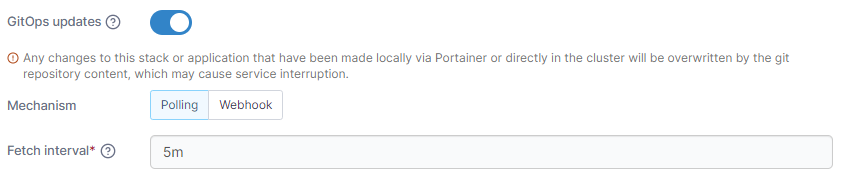
Portainer supports automatically updating your stacks deployed from Git repositories. To enable this, toggle on **GitOps updates** and configure your settings.
{% hint style="info" %}
For more detail on how GitOps updates function under the hood, have a look at [this article](/portainer-documentation/sts/faqs/troubleshooting/stacks-deployments-and-updates/how-do-automatic-updates-for-stacks-applications-work.md).
{% endhint %}
| Field/Option | Overview |
| -------------- | ------------------------------------------------------------------------------------------------------------------------------------------------------------------------------------------------------------------------------------------------------------------------------------------------------------------------------------------ |
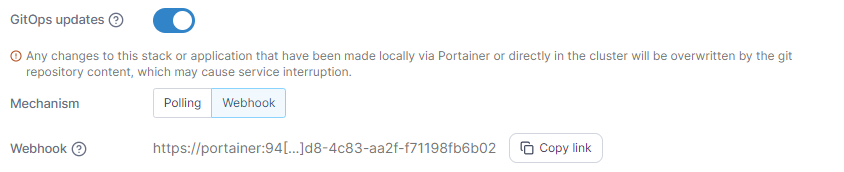
| Mechanism |
Select the method to use when checking for updates: Polling: Periodically poll the Git repository from Portainer to check for updates to the repository.
Webhook: Generate a webhook URL to add to your Git repository to trigger the update on demand (for example via GitHub actions).
|
| Fetch interval | If **Polling** is selected, how often Portainer will check the Git repository for updates. |
| Webhook | When **Webhook** is selected, displays the webhook URL to use in your integration. Click **Copy link** to copy the webhook URL to the clipboard. |
Enable this setting to always pull the most recent version of container images when updating the stack. This is equivalent to the --pull=always flag for docker run. This option was previously labeled as Pull latest image.
|
| Force redeployment |
Enable this setting to force the redeployment of your stack at the specified interval (or when the webhook is triggered), overwriting any changes that have been made in the local environment, even if there has been no update to the stack in Git. This is useful if you want to ensure that your Git repository is the source of truth for your stacks and are happy with the local stack being replaced.
If this option is left disabled, automatic updates will only trigger if Portainer detects a change in the remote Git repository.
|
### Relative path volumes
When you toggle **Enable relative path volumes** to on, you are able to specify relative path references in your compose files. Portainer will create the required directory structure and populate the directories with the relevant files from your Git repository.
On Docker Standalone and Podman environments, specify the path at which you want your files to be created on your host filesystem in the **Local filesystem path** field.
{% hint style="warning" %}
Ensure this directory exists on your local filesystem and is writable.
{% endhint %}
On Docker Swarm environments, specify the path at which you want your files to be created in the Network filesystem path field.
{% hint style="warning" %}
Ensure that this path is available on all of your Docker Swarm nodes and is writable.
{% endhint %}
{% hint style="info" %}
For more detail on how this feature works, have a look at [this article](/portainer-documentation/sts/advanced/relative-paths.md).
{% endhint %}
### Environment variables
As an optional step, you can also set environment variables. You can use these to define values in your compose file that would vary between deployments (for example, hostnames, database names, etc).
Environment variables can be set individually within Portainer or you can use **Load variables from .env file** to upload a file containing your environment variables. Environment variables you define (either individually or via a .env file) will be available to use in your compose file using an `environment` definition:
```
environment:
MY_ENVIRONMENT_VARIABLE: ${MY_ENVIRONMENT_VARIABLE}
```
Alternatively, you can add `stack.env` as an `env_file` definition to add all the environment variables that you have defined individually as well as those included in an uploaded .env file:
```
env_file:
- stack.env
```
{% hint style="info" %}
Note the compose file is not changed when environment variables are used - this allows variables to be updated within Portainer without editing the compose file itself which would take it out of sync with the Git repository. You will still see the `${MY_ENVIRONMENT_VARIABLE}` style entry in the compose file.
{% endhint %}
Enter environment variables if required then click **Deploy the stack**.