> For the complete documentation index, see [llms.txt](https://docs.portainer.io/llms.txt). Markdown versions of documentation pages are available by appending `.md` to page URLs; this page is available as [Markdown](https://docs.portainer.io/portainer-documentation/sts/admin/add-ons.md).

# Add-ons

{% hint style="info" %}
Add-ons are only available to admin users in [Portainer Business Edition](https://www.portainer.io/business-upsell?from=addons) and require a local Kubernetes environment. For a full list of add-on requirements, [check out this FAQ](https://docs.portainer.io/portainer-documentation/sts/faqs/getting-started/add-on-requirements.md).
{% endhint %}

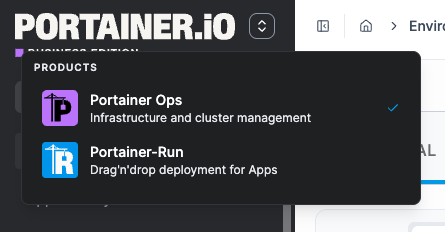
Portainer Add-ons are applications that extend Portainer. From this view, you can install and manage any available add-on applications. Add-ons are deployed as Helm releases into your local Kubernetes cluster and appear as separate tools in the sidebar switcher.

### Add-ons catalog

The catalog lists every add-on available and is updated dynamically from the [catalog URL](https://docs.portainer.io/portainer-documentation/sts/admin/settings/general.md#add-on-settings), so new and updated add-ons appear without updating Portainer. Each card shows the add-on's name, description, installed version, and current status, along with the actions available for that state.

These are the current add-ons listed in the default add-on catalog:

<table data-card-size="large" data-view="cards"><thead><tr><th></th><th></th><th data-type="content-ref"></th><th data-hidden data-card-cover data-type="image">Cover image</th></tr></thead><tbody><tr><td><h4>Portainer-Run</h4></td><td>Portainer-Run is a governed self-service layer that lets non-developer business teams deploy the apps they build with AI tools onto your organization's own Kubernetes, without ever needing to know anything about Kubernetes, containers, or infrastructure.</td><td><a href="https://docs.portainer.ai/portainer-run">https://docs.portainer.ai/portainer-run</a></td><td data-object-fit="contain"><a href="https://content.gitbook.com/content/mv26SNKCYAMuOXsw4yjn/blobs/WfPuAF8hbE8xxs45Wx06/portainer-run-svg.svg">portainer-run-svg.svg</a></td></tr><tr><td><h4>Portainer-Command</h4></td><td>Portainer-Command is the MCP gateway between your AI agent and your cluster; agents get expiring read-only sessions with a stated rationale, and every change arrives as a Git pull request that a person approves before Portainer applies it.</td><td><a href="https://docs.portainer.ai/portainer-command">https://docs.portainer.ai/portainer-command</a></td><td data-object-fit="fill"><a href="https://content.gitbook.com/content/mv26SNKCYAMuOXsw4yjn/blobs/k8gX9uu8pZ1rlxeCdcCi/favicon.svg">favicon.svg</a></td></tr><tr><td><h4>Portainer-IDP</h4></td><td>Portainer-IDP (Internal Developer Portal) lets developers deploy, scale, restart, roll back and monitor applications on Kubernetes without learning Kubernetes, inside guardrails your platform team sets once.</td><td><a href="https://docs.portainer.io/portainer-idp">https://docs.portainer.io/portainer-idp</a></td><td data-object-fit="fill"><a href="https://content.gitbook.com/content/mv26SNKCYAMuOXsw4yjn/blobs/QqR5YFOEjzzlg2cWS0aH/Portainer-IDP.svg">Portainer-IDP.svg</a></td></tr></tbody></table>

{% content-ref url="/pages/cZy1KvgbYNS08TqiS7SM" %}
[Installing an add-on](https://docs.portainer.io/portainer-documentation/sts/admin/add-ons/installing-an-add-on.md)
{% endcontent-ref %}

{% content-ref url="/pages/volC9bY0YffuLpmW93SC" %}
[Managing an installed add-on](https://docs.portainer.io/portainer-documentation/sts/admin/add-ons/managing-an-installed-add-on.md)
{% endcontent-ref %}

### Add-on switcher

{% hint style="info" %}
Add-ons that are not healthy appear in the switcher but are shown as disabled - they cannot be launched until restored.
{% endhint %}

Click the product switcher icon in the sidebar to see all enabled add-ons as external links.

<figure><img src="https://content.gitbook.com/content/mv26SNKCYAMuOXsw4yjn/blobs/KN6raMxqkLyBHS5fxJy7/2.44-add-ons.png" alt=""><figcaption></figcaption></figure>