> For the complete documentation index, see [llms.txt](https://docs.portainer.io/llms.txt). Markdown versions of documentation pages are available by appending `.md` to page URLs; this page is available as [Markdown](https://docs.portainer.io/faqs/troubleshooting/logs-errors-and-debugging/why-is-my-console-closing-after-a-certain-time.md).
# Why is my console closing after a certain time?
### Is your container console or Kube-shell in Portainer closing on its own and you have published Portainer via reverse proxy?
This could be related to a time out setting in your reverse proxy and can be changed. Below are some examples of how this can be done for nginx based proxies.
In below examples, change the value `3600` to match your requirement.\
\
**Nginx Server**:\
add the following to the `nginx.conf` file.
```
proxy_read_timeout 3600;
```
\
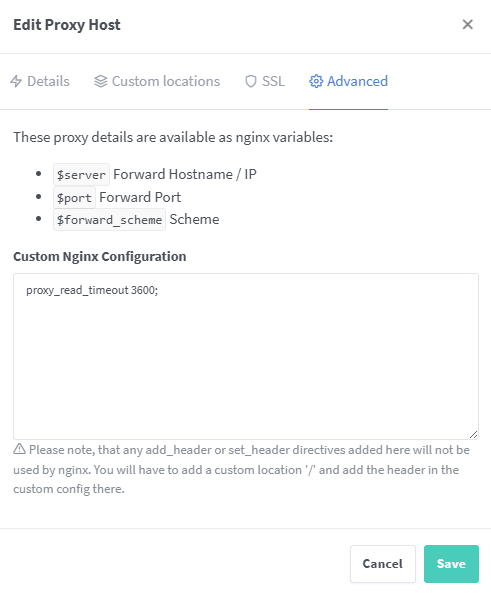
**Nginx Proxy Manager:**
Edit the proxy host that you need to change and add `proxy_read_timeout 3600;` as below.
**Nginx Ingress Controller (Kubernetes)**\
\
You need to add the following annotation to the Ingress object\
`nginx.ingress.kubernetes.io/proxy-read-timeout: 3600`