> For the complete documentation index, see [llms.txt](https://docs.portainer.io/llms.txt). Markdown versions of documentation pages are available by appending `.md` to page URLs; this page is available as [Markdown](https://docs.portainer.io/2.39-lts/admin/environments/policies/docker-policies/rbac-policy.md).
# Create a Docker, Swarm or Podman RBAC policy
Define a policy based on access permissions and role-based access control for Docker, Swarm or Podman environments.
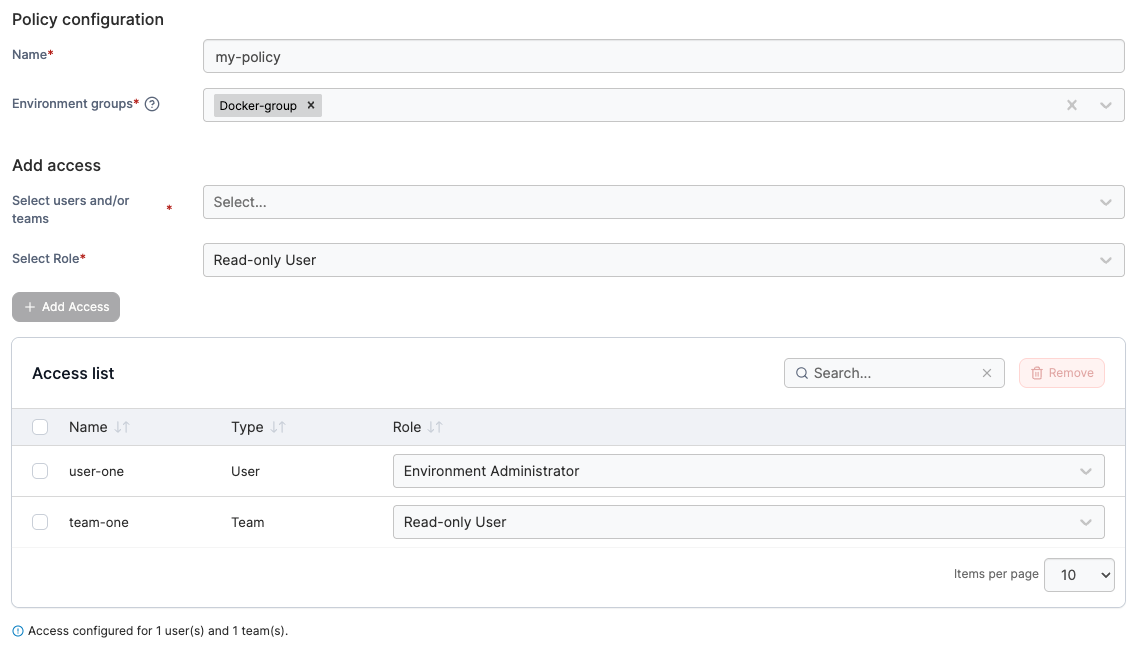
To create a RBAC policy, in the menu, under **Environment-related**, select **Policies** then select **Create policy**. From the policy type list, navigate to the **Docker** > **RBAC** section, select **Custom** then select **Continue** to begin configuring the policy.
{% hint style="info" %}
Currently, only custom RBAC policies can be created. Future improvements to the policies feature will introduce policy templates.
{% endhint %}
| Field/Option | Overview |
| ------------------ | ------------------------------------------------------------------------------------------------------------------------------------------------------------------------------------------------------------------------------------------------ |
| Name | Define a name for this policy. |
| Environment groups |
Select one or more environment groups from the dropdown menu. If the selected group is already included in an existing policy, a warning icon will appear next to the group name.
|
| Users/teams | Select one or more [users](/2.39-lts/admin/user/users.md) or [teams](/2.39-lts/admin/user/teams.md) from the dropdown menu. |
| Role | Select the role you want to assign to the users or teams. |
Click **Add Access** to add the user/team to the policy, multiple users or teams can be added. Each access added will show in the **Access list**. When you have finished adding access, click **Create policy**. A confirmation screen displays the changes being made and any existing policy that will be replaced. Click **Confirm** to acknowledge the changes and create the policy.