# Add a ConfigMap

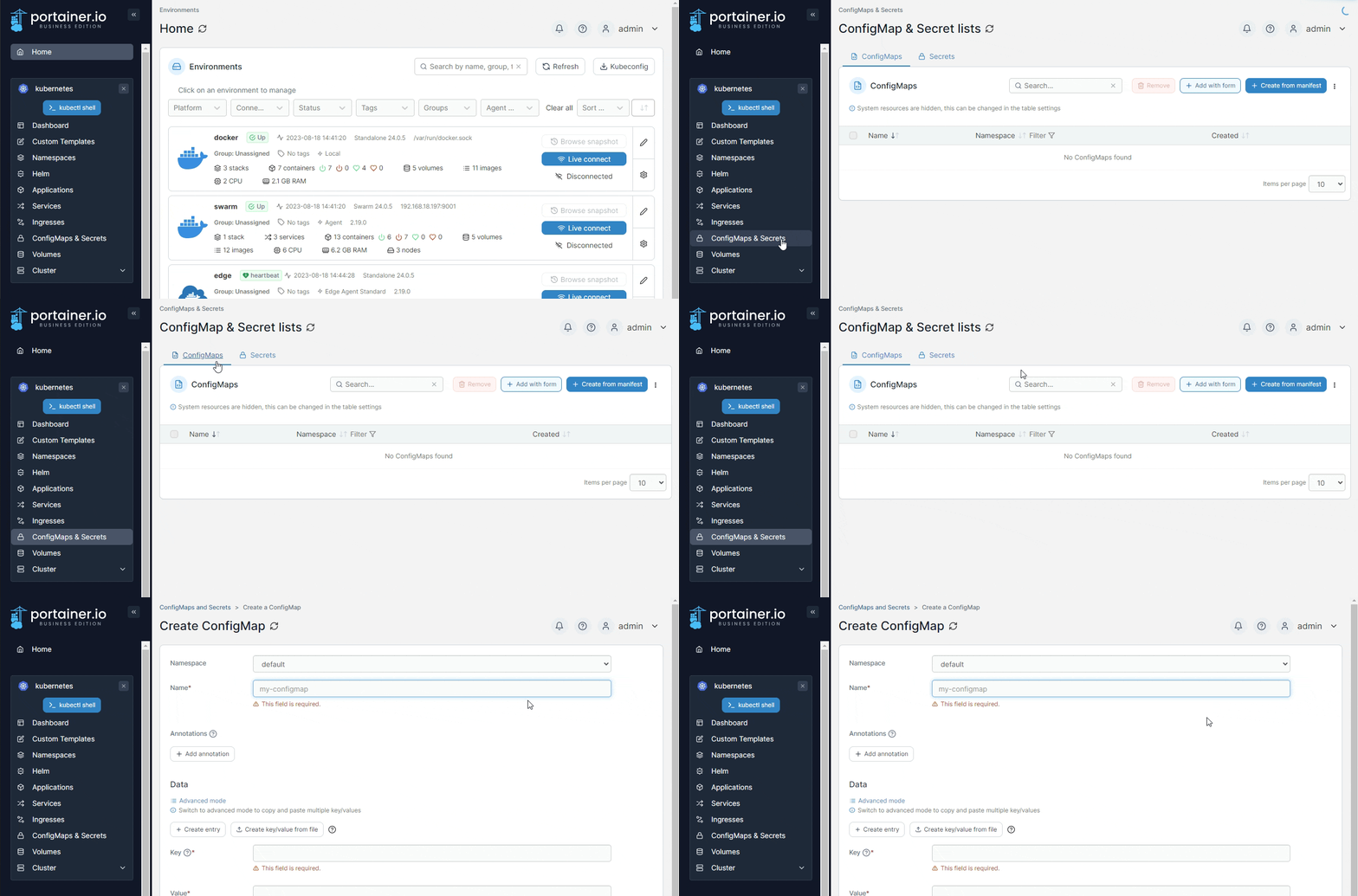
From the menu select **ConfigMaps & Secrets**, ensure the **ConfigMaps** tab is selected, then click **Add with form**.&#x20;

{% hint style="info" %}
ConfigMaps can also be added [using a manifest](https://docs.portainer.io/2.33-lts/user/kubernetes/applications/manifest) by clicking **Create from manifest**.
{% endhint %}

<figure><img src="https://3850702872-files.gitbook.io/~/files/v0/b/gitbook-x-prod.appspot.com/o/spaces%2FXI7douejaBgpZ6CP2zJf%2Fuploads%2Fgit-blob-65e2079b9764b8db37f27bce70c45ad979443eb3%2F2.19-kubernetes-configurations-configmaps-add.gif?alt=media" alt=""><figcaption></figcaption></figure>

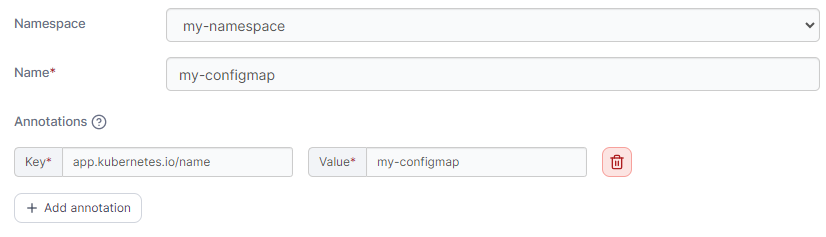
Define the ConfigMap, using the table below as a guide.

| Field/Option | Overview                                                                                                                              |
| ------------ | ------------------------------------------------------------------------------------------------------------------------------------- |
| Namespace    | Select the namespace where the ConfigMap will be saved.                                                                               |
| Name         | Give the ConfigMap a descriptive name.                                                                                                |
| Annotations  | You can add annotations to your ConfigMap as required by clicking **Add annotation** and filling in the **Key** and **Value** fields. |

<figure><img src="https://3850702872-files.gitbook.io/~/files/v0/b/gitbook-x-prod.appspot.com/o/spaces%2FXI7douejaBgpZ6CP2zJf%2Fuploads%2Fgit-blob-e31be846fb1246a1943983e7b62da615779a423f%2F2.19-kubernetes-configurations-configmaps-add.png?alt=media" alt=""><figcaption></figcaption></figure>

In the **Data** section you can enter the details of your ConfgMap, in either **Simple mode** or **Advanced mode**. Under Simple mode you can add entries in a key and value format, and in Advanced mode you can paste in multiple values in YAML format.

<figure><img src="https://3850702872-files.gitbook.io/~/files/v0/b/gitbook-x-prod.appspot.com/o/spaces%2FXI7douejaBgpZ6CP2zJf%2Fuploads%2Fgit-blob-0ba61521b6948b6dbc1c1ed63abc7af57ec407a7%2F2.15-kubernetes_configmap_add_form_config_data.png?alt=media" alt=""><figcaption><p>Adding data in Simple mode</p></figcaption></figure>

<figure><img src="https://3850702872-files.gitbook.io/~/files/v0/b/gitbook-x-prod.appspot.com/o/spaces%2FXI7douejaBgpZ6CP2zJf%2Fuploads%2Fgit-blob-b1d623bf881aeaa1f4fbc796f95c3471d8fb7384%2F2.15-kubernetes_configmap_add_from_config_data_simple.png?alt=media" alt=""><figcaption><p>Adding data in Advanced mode</p></figcaption></figure>

When you have finished defining the ConfigMap, click **Create ConfigMap.**